





4
Free
FileZilla
Free and powerful FTP client

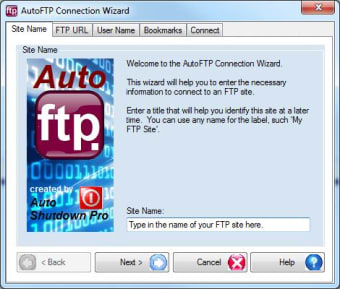
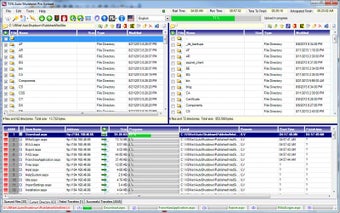
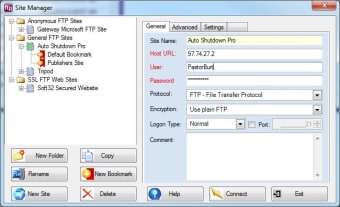
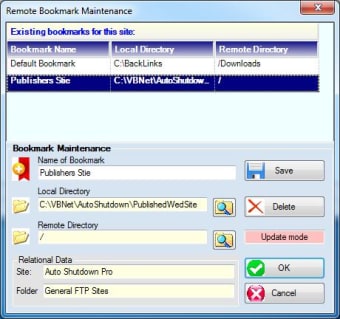
AutoFTP gives you the FTP Client features you want and need, and it's absolutely free: Multi-threading, lightening fast, user friendly controls, convenient reporting that keeps you informed, with scheduling that anyone can master. AutoFTP is reliable, modern, and capable of handling the heaviest FTP uploads or downloads. AutoFTP supports FTP, but also FTPS and Anonymous sites. AutoFTP interfaces to all Windows and Unix based FTP servers. The software has modern controls to get the job done easily: Site Manager, Connection Wizard, Properties Manager, and Quick Connect. User's have full-featured editor for both web pages and documents remotely and locally. AutoFTP comes with contact-sensitive help and five video tutorials online.
AutoFTP has more competitive advantages over older FTP clients: For example, AutoFTP is faster than FileZilla, more user friendly, better reporting, and of course it has scheduling, whereas FileZilla has no scheduling capacity whatsoever. CuteFTP is still faster than AutoFTP and FileZilla, but AutoFTP beats CuteFTP in being more user friendly, with better reporting and scheduling. Unlike its competitors, AutoFTP has easy to understand report, such as an overall progress bar at the top for transfers, showing start time, total run time, time left till completion, and predicted actual time of completion. The competitors don't have this. AutoFTP offers 7 different types of URL encoding, not offered by the competition. Modern controls!
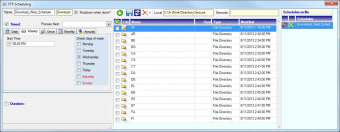
The game changer for AutoFTP is scheduling, that is out-of-the-box point-and-click scheduling. The leading FTP client in the market today, FileZilla, has no scheduling capacity whatsoever. CuteFTP, the leading shareware client, has scheduling that requires either scripting, programming or both; capabilities not common to most FTP users. AutoFTP scheduling requires no scripting or programming whatsoever. The software is fully automated, requiring less manual steps to initiate transfers.
AutoFTP is perfect for all Windows platforms, PCs, laptops, notebooks, and tablets. At the click of a button, AutoFTP will run in any one of 66 different languages, embracing 98.4 of the world's literate population. For home, office, or school.

Download programs through an FTP server

A trial version Downloading program for Windows
Automate a number of FTP tasks
Free
3.0.0.0
Windows
Windows 7
English
4.1K
815.05 KB
Have you tried AutoFTP? Be the first to leave your opinion!
Add reviewDownload programs through an FTP server
A trial version Downloading program for Windows
Automate a number of FTP tasks
New version of the most popular FTP client

Advanced FTP server
Free and powerful FTP client
.png)
Transfer and manage files within a network
Gene6 FTP Server is a professional secure Windows FTP Server

Windows Socket FTP client program to transfer files over the Internet
FTP client and FTP server free for home users
Secure and intuitive FTP server
Freeware FTP Client with the look and feel of Windows Explorer

Web sites updating made easy
A native ftp server for windows 2000, 2003 and XP

SecureFX: Reliable FTP Client for Windows

Secure FTP: Reliable File Transfer for Windows
An straightforward FTP client with support for multithreading and resuming
Gene6 FTP Server is a professional secure Windows FTP Server

Complete FTP client with interesting features
Efficient FTP Client for Windows Users